Apple's new iPhone 5s will feature Touch ID, a fingerprint sensor whcih will be used for security and authentication. This new feature will greatly aid blind and visually impaired users who currently struggle with or ignore the passcode ID security feature on the iPhone. Also, buying Apps from the App Store and music and videos from iTunes will no longer require users to enter their passwords if they have an iPhone 5s. Simply place your thumb over the home button and your transactions will now be authenticated and executed. NICE!!! by Apple, the 5C is certainly more colorful than any other Apple phone, perhaps even more colorful than any iPod. Instead of the metallic finishes that usually adorn Apple products, the 5C's color scheme looks like it was designed by either a candy manufacturer or an elementary school art class. However, Apple emphasizes that though it looks playful, it is still a phone equal in power and performance to the iPhone 5. Phil Schiller, Apple's VP of marketing, said that the company also hasn't skimped on its structure, saying that the 5C is reinforced with steel. "You are going to be blown away by how rigid and great it feels in your hand," said Schiller.
Since this year’s WWDC keynote ended, the focus of any analysis on iOS 8 has been itsfeatures — things like Continuity, Extensions, and iCloud Drive. This is, of course, expected: iOS is the operating system that drives Apple’s most important (and most profitable) products, so it’s natural that the limelight be shone on the new features for the mass market.
As I’ve written, however, the Accessibility features that Apple includes in iOS are nonethelessjust as important and innovative as the A-list features that Craig Federighi demoed on stage at Moscone. Indeed, Apple is to be lauded for their year-over-year commitment to improving iOS’s Accessibility feature set, and they continue that trend with iOS 8.
Here, I run down what’s new in Accessibility in iOS 8, and explain briefly how each feature works.
Alex. Apple is bringing Alex, its natural-sounding voice on the Mac, to iOS. Alex will work with all of iOS’s spoken audio technologies (Siri excepted), including VoiceOver, Speak Selection, and another new Accessibility feature to iOS 8, Speak Screen (see below). In essence, Alex is a replacement for the robotic-sounding voice that controls VoiceOver, et al, in iOS today.
Speak Screen.With Speak Screen, a simple gesture will prompt the aforementioned Alex to read anything on screen, including queries asked of Siri. This feature will be a godsend to visually impaired users who may have issues reading what is on their iPhone and/or iPad. It should be noted that Speak Screen is fundamentally different from Speak Selection, which only reads aloud selected text. By contrast, Speak Screen will read aloud everything on the screen — text, button labels, etc.
Zoom. Apple has made some welcome tweaks to its Zoom functionality in iOS 8. The hallmark feature is users now have the ability to specify which part of the screen is zoomed in, as well as adjust the level of the zoom. In particular, it’s now possible to have the virtual keyboard on screen at normal size underneath a zoomed-in window. What this does is makes it easy to both type and see what you’re typing without having to battle the entirety of the user interface being zoomed in.
Grayscale. iOS in and of itself doesn’t have “themes” like so many third-party apps support — and even like OS X Yosemite’s new “dark mode”. iOS does, however, support a pseudo-theme by way of Invert Colors (white-on-black). In iOS 8, Apple is adding a second pseudo-theme to the system with Grayscale. With this option turned on, the entirety of iOS’s UI is turned, as the name would imply, gray. The addition of a Grayscale is notable because it gives those users who have issues with colorized display — or who simply view darker displays better — another way to alter the contrast of their device(s).
Guided Access. The big addition to Guided Access is that Apple is leveraging its own new-to-iOS-8 Touch ID developer API to enable users to be able to exit Guided Access using their scanned fingerprint. This is a noteworthy feature because it effectively guarantees that students (or test-takers or museum visitors) can’t leave Guided Access to access the Home screen or other parts of iOS.
As well, Apple has added a time limit feature to Guided Access, thereby allowing teachers, parents, and the like to specify the length of time Guided Access is to be used. Especially in special education classrooms, features such as Touch ID to exit and the timer can be extremely powerful in ensuring an uninterrupted learning experience, keeping students on task yet still set the expectation that a transition (i.e., “You can play games now”, for instance) will take place in X minutes. In terms of behavior modification, Guided Access’s new features are potentially game-changing, indispensable tools for educators.
Enhanced Braille Keyboard. iOS 8 adds support for 6-dot Braille input system-wide. This feature involves a dedicated Braille keyboard that will translate 6-dot chords into text.
“Made for iPhone” Hearing Aids. Apple in iOS 8 has improved its Made for iPhone Hearing Aids software so that now users who use hearing aids and have multiple devices now can easily switch between them. Moreover, if a hearing aid is paired with more than one device, users will now be able to pick which device they’d like to use.
Third Party Keyboard API. This topic (as well as QuickType) is worthy of its own standalone article, but the accessibility ramifications of iOS 8’s third party keyboard API are potentially huge for those with special needs.
A third-party keyboard on iOS 8. (Source: Apple.com)
Anecdotally speaking, I hear from several low vision iOS-using friends who lament the default system keyboard, which is essentially the same keyboard that shipped with the original iPhone in 2007. The problem, my friends say, is that the key caps are too small and the glyphs too hard to read. With the new API, though, third party developers such as the team at Fleksycan create entirely customized keyboards that users can use instead of the stock one. This means developers can control key spacing and size, color, and so forth in an effort to create keyboards that accommodate for a wide array of visual — and motor — needs.
They really believe the new Fleksy will benefit a lot of people with special needs.
Miscellany. iOS 8 brings with it a few housekeeping changes to Settings.app, where the Accessibility options are located. For example, the Subtitles & Captioning option — which previously was found under Hearing — has been moved to a new Media section, right next to a new Video Descriptions toggle. Furthermore, the Physical & Motor pane — home to such features as Switch Control and AssistiveTouch — has been rechristened Interaction.
Thank you techradar.com for the information for this post.
The excitement of the rumor mill, the titillation of every leaked photo led to higher than ever levels of expectation for the iPhone 5, and while the announcement was greeted with some derision at the lack of perceived headline improvements, the record sales tell an entirely different story.
Given the underwhelming changes to the iPhone 4S, the iPhone 5 really needed to re-energize customers to prove Apple can repeat the game-changing trick it managed with the iPhone 4.
Design
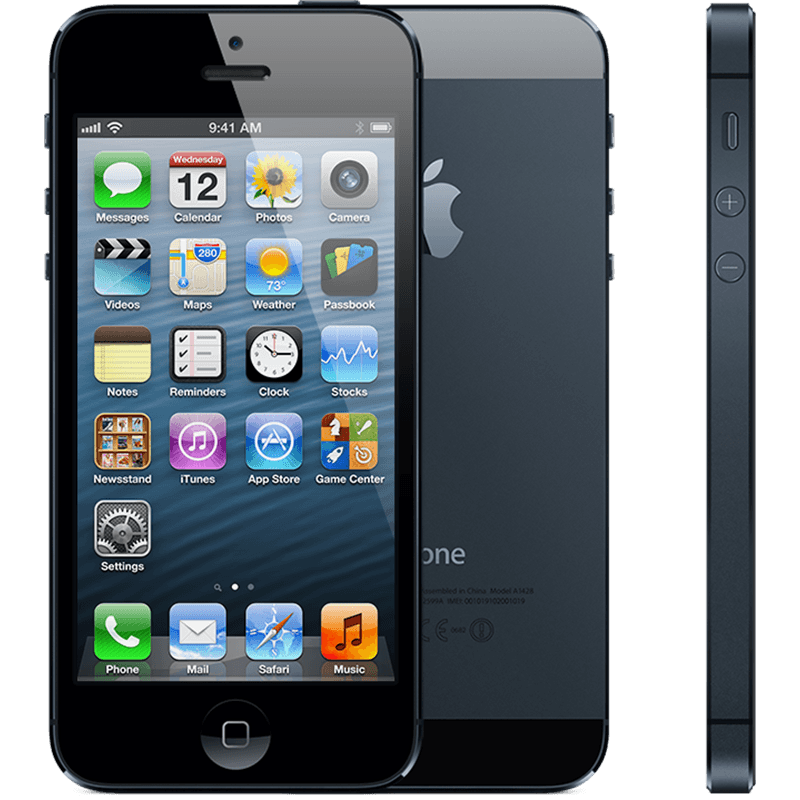
We'll begin in the traditional manner: how the thing actually feels in the hand. With the iPhone 5 there were many types of prospective buyers: the upgrader from the 4 (or more-money-than-sense iPhone 4S upgraders), those tired of their Android handset and those taking their first steps in the smartphone market and want to get one of them iThingies their friends has.
Well, all of those picking up the iPhone 5 will have the same reaction: this thing is amazingly light. You've probably heard the numbers by now (20 percent lighter than the predecessor, as well as beating most of the opposition too at 112g.)
It's an odd sensation, but it actually detracts from the experience when you first pick it up. We've praised the weighty feel of the iPhone in the past, lending it a premium feel in the face of toy-like phones, and it's almost disappointing that Apple decided to join that clan.
However, through extended use this problem quickly disappears, as the overall effect of the phone is still a chassis designed for strength, it just sits more anonymously in the pocket.
You'll obviously see the change in height, too – the iPhone 5 stands 4.87-inches tall to allow for the larger 4-inch screen. In truth, those not familiar with the iPhone 4S probably wouldn't notice the difference, which is why it's a good move from Apple to include the larger screen if it's not going put people off that hate larger phones.
The decision to stick at 4-inches is Apple's admission that while it recognizes people are all over the idea of having more screen real estate to play with it doesn't want to move away from the thumb-friendly nature of the device.
Through a mixture of moving the centre of gravity slightly as well as repositioning the screen within the bezel, it's still possible to scroll your thumb mostly around the whole display one-handed, which Apple is clearly keen to keep hold of.
However, we're not convinced of that argument any more, and the power button was still a little out of reach when using the phone normally, as was anything in the top left-hand corner of the screen.
This was no issue in reality, as scooting the phone down a bit in the palm is a natural action. But if that's the case, then why not offer a 4.3-inch screen at least?
There's more to a phone than a screen these days (although increasingly less and less) and the general construction of the iPhone 5 is excellent to say the least.
We've tested both the ceramic white version and the anodized black, and the two-tone effect on the back of the phone is stunning, both visually and under the finger.
The two sections of pigmented glass at the top and the bottom of the phone add a pleasant effect, and the sapphire glass is meant to be thoroughly durable, to complement the Gorilla Glass on the front.
Apple knows consumers get furious when they drop an iPhone, and is clearly seeking to stop the smashes before they happen with a tougher exterior - although it seems the anodized black version is more prone to scratching, which means, sadly, you'll have to think about getting a cover for that beautiful frame.
The same industrial band around the outside is in effect again as on the iPhone 4 and 4S, with small sections removed where the antenna joins.
Apple has gone for a more advanced form of antenna here, meaning the days of lost signal are gone, and generally increasing the power of your call connection and GPS lock on, too.
zYou can buy an adaptor, but it's going to be pricey: $30 when it lands in October. And unless you want to keep it permanently attached to the bottom of your iPhone 5 you'll need to buy a few, which is far from ideal.
However, let's not harangue Apple too much for this: a smaller connector is not only easier to use (you can plug the smaller cable in either way round, and the connection feels more solid), but you're rewarded with a thinner and more compact phone to boot.
The decision to move the 3.5millimeter headphone jack to the bottom is an odd one, as while it allows you to slip the phone into the pocket head-first when listening to music, which is a more natural action, it's a real pain in the posterior for some apps that will only work in landscape a certain way up.
Using it this way means your headphones experience will be one of having to jiggle the jack around two fingers.
It's not the most comfortable way to hold a phone, and even when using the phone in portrait mode, the jack gets in the way somewhat.
There are other smaller design changes to the iPhone 5 too, such as the iSight front-facing camera moving to the middle and the home button being noticeably more robust to help reduce instances of a broken portal to your home screen.
But enough about what the phone looks like - the killer question is how the thing feels in hand. We'll sum it up by saying this: smooth. It's a little slippery, and we were always worried we would drop the darn thing.
But that's the only negative thing about the design (apart from the low weight initially) as it sits in the palm nicely and allows you to do it all with one hand, including hitting the top-mounted power/lock button with ease.
That lock button is actually still loose, as it was on the iPhone 4S, meaning when you shake the phone around you can hear it clicking away, which undoes a lot of the premium feel Apple is going for.
Make no mistake, the iPhone 5 is one of the most beautifully crafted phones out there - but when you're paying $199 up front for the thing, we'd hope this would be the very minimum Apple would do.
And while it looks nice, from the front it doesn't really add much to the design of the iPhone - it's certainly not the same as the jaw-dropping design of the iPhone 4 compared to the 3GS... it's just another evolution in the iLine. It's not bad, but for those that hoped the iPhone 5 would be another big change there's a good chance they'll be disappointed about the look... until they feel the lovely back.
There was a real chance here for Apple: remove the bezel and give the front of the screen a look that's similar to the OLED TVs from the likes of Samsung or LG… but instead we're treated to the same lines as before.
You always get the feeling that Apple saves what it can for the next iteration of the iPhone, and while there's nothing wrong with the current construction we can see the edge-to-edge screen becoming something amazing on the iPhone 6.
Thevisual change between iOS 7 and iOS 6is obviously significant, and this graphic does a great job of showing just how theiOShome screen has evolved over time with theiPhone. Covering versions 1.0through 7.0 and a time period of 2007 to 2013, it gives an interesting look into how things have changed in the past and how they are changing now:
When set alongside each other like this the newest changes with 7 look less drastic, but certainly much brighter and more colorful than before. In some ways the iOS 7 home screen has more commonality with the original 1.0 through 3.0 releases than the more recent 4, 5, and 6 builds, at least in flatness and the Dock design. If you want to get a preview of what 7.0 will look like on your iPhoneor iPod touch,load these iOS 7 preview videos and screen shotson your iOS device, they do a fairly good job of what toexpect, A lot has happened since 2007. Just look at how much the iPhone home screen has changed. Or how little it has? Back in the days of the first iPhone (it wasn't even called iOS yet), we couldn't get third party apps or even move apps around. Now, we have a bigger screen and all these funktastic icons.
It is impressive to see the consistency (or is it stubborness) that Apple has had with the iPhone home screen. Reddit user iKurac cooked up this graphic* to show the gradual additions and slow evolution of iOS over the years. Up until iOS 7,
it's only added new apps. Now that iOs 7 is released , iOS 1 to iOS 6 will be part of the ancient era of iPhone. Something that'll be buried in a time capsule next to Android 1.0, Blackberry, Palm and Windows Mobile.
Phone 3G's back featured a redesigned plastic polycarbonate housing, replacing the aluminum back of the first generation. Buttons were changed from plastic to metal, and the edges of the phone were tapered, providing a better grip. The iPhone 3G introduced the first official color options for the outer casing, with the 16GB version available in black and white.
The dimensions of the iPhone 3G were slightly larger than those of the original iPhone. It was 116 millimetres (4.6 in) high, 62 millimetres (2.4 in) wide, and 12 millimetres (0.47 in) deep, compared to its predecessor, which was 110 millimetres (4.3 in) high, 61 millimetres (2.4 in) wide, and 12 millimetres (0.47 in) deep (HVGA) resolution at 163 ppi, with scratch-resistant glass sitting on top of the display. The capacitive touchscreen was designed for a bare finger, or multiple fingers for multi-touch sensing.
The device featured the same sensors as its predecessor. The proximity sensor (which deactivates the display during calls when the face is near) was repositioned to save battery power and to prevent inadvertent inputs from the user’s face and ears. An ambient light sensor was included to adjust the display brightness for different lighting conditions, which helps save battery power. A 3-axis accelerometer was included to sense the orientation of the phone and change the screen accordingly, allowing the user to easily switch between portrait and landscape mode.
On the rear of the device, the iPhone 3G featured the same fixed-focus 2.0 megapixel camera of its predecessor. It had no optical zoom, flash, or autofocus, and did not support video recording (though various applications became available to allow video recording on the device). The iPhone 3G's operating system also now supported the geotagging of photographs.Apple iPhone 3G adds support of 3G HSDPA fast data and GPS. It has the same screen, camera, OS and memory (8 or 16GB) as the first one, and almost the same design but now will accept any 3.5mm headphones. It will run on the new software version which support third party application thanks to the official SDK.The iPhone 3G came preloaded with the latest version of iPhone OS to offer users the newest and most capable software. The device continued to receive updates to its software for over two years, with major iterations released on an annual basis. However, the phone had access to a decreasing proportion of new features with each update as its hardware became superseded by later models.
At launch in July 2008, the iPhone 3G came preloaded with iPhone OS 2.0. This introduced the App Store, Microsoft Exchange ActiveSync support, Apple’s MobileMe service, and push email support, along with other new features and bug fixes.
In June 2009, iPhone 3G users received the iPhone OS 3.0 software update, which introduced the long-awaited MMS feature, copy and paste, landscape support for more applications, Bluetooth stereo support, and other improvements.
In June 2010, users received the iOS 4.0 software update. Unlike owners of its successor models, users of the iPhone 3G did not gain access to important features included with iOS 4.0 such as multitasking, the ability to set a home screen wallpaper, or Bluetooth keyboard support. However, it did provide access to a unified mailbox feature, homescreen folders to better organise apps, playlist creation, and other enhancements. This update was widely criticized by users of the iPhone 3G for slow performance, though an updated iOS 4.1, released September 2010, improved this problem. However, unlike more modern iOS devices, this update again did not provide iPhone 3G owners with access to important features, in this case the Game Center application.
On November 23, 2010, the iPhone 3G received the iOS 4.2 software update, which included new features such as YouTube voting, and security fixes. However, the iPhone 3G was unable to use many features included in this update, such as AirPlay and Safari Text Search.
The last release of iOS to support the 3G model was 4.2.1, released on November 22, 2010. iOS 4.3, released on March 11, 2011, did not support the iPhone 3G, with Apple discontinuing further updates.[12]
A key enhancement introduced with iPhone OS 2.0, and therefore an important feature of the iPhone 3G, was theApp Store , an iconic way to find and install third-party applications on users' devices. Before this feature was introduced, the only way to install custom applications on the device was via jailbreaking, which is strongly discouraged and unsupported by Apple. There were 500 applications available for download at the launch of the App Store, though this amount has grown dramatically since then.
To see more on the future of the Apple iPhone click here.
Apple Live video special event Click here to watch. Something that people are Hoping to be a guest on Apple's life event are.
The much talked about iPhone6 seven key features that iPhone six will have. Just a few. 1. A bigger iPhone As phones trend towards "phablet" sizes somewhere between the average smartphone and a tablet, Apple is expected to try and compete with the Galaxy models by releasing an iPhone 6 with a 4.7-inch display and an even larger 5.5-inch display. Different reports, however, suggest the larger model, a full 1.5 inches bigger than the iPhone 5C and 5S, may not be released or even announced until December.
2. A faster processor and "improved" battery life The iPhone 5C, which replaced the iPhone 5, has an A6 processor, and the iPhone 5S has a twice-as-fast A7 processor. So if history's any indicator, the iPhone 6 will have a faster A8 processor. Apple also claims every model has improved battery life, so similar boasts are expected this year -- though it's hard to imagine happening if the phone is bigger and faster.
3. A better camera The iPhone 5, 5C and 5S had 8.0 megapixel iSight cameras, but experts predict the iPhone 6 will have a 13.0 megapixel camera with optical image stabilization for taking better photos and video while moving. According to Forbes, Apple has improved its camera lenses in recent models to prepare for the higher resolution, which will likely stick around for the next few models.
4. iOS 8 Pretty much every new iPhone or iPad comes with a new operating system, and Apple unveiled iOS 8 in June with an expected fall release date. The most buzzed-about features include a HealthKit app with users' medical information, vital signs and diet/fitness monitoring; CarPlay, for in-car functionality; a HomeKit app that can be a remote control for "smart" household appliances (like an AppleTV); and "QuickType," a SwiftKey-like text assistant that helps users finish sentences rather than just offer correct spelling.
5. At least one rumored product won't be included Will the iPhone 6 have a NFC (near field communication) chip that allows users to make purchases with their smartphone, like a credit card? Will a long-rumored "iWatch" actually happen, joining the new craze of smartwatches and wearable devices? Will Sapphire glass displays replace Corning's famed Gorilla Glass design? And are new headphones coming out, replacing its Beats-compatible headphone jacks with a Lightning port? The tech giant could do all of those, but expect at least one of those to be left out.To read more go to.
Also iOS 8′s
Since this year’s WWDC keynote ended, the focus of any analysis on iOS 8 has been itsfeatures — things like Continuity, Extensions, and iCloud Drive. This is, of course, expected: iOS is the operating system that drives Apple’s most important (and most profitable) products, so it’s natural that the limelight be shone on the new features for the mass market. To learn more go to
Also don't forget the much talked about iWatch
If it feels like the promise of an Apple smartwatch has been looming forever, that's because it has. And its shadow helped birth the army of other smartwatches that we have today. But now, finally, the near mythical iWatch is rumored to arrive very soon. Here's what we think we know.
What's it called?
Colloquially, Apple's upcoming watch has been referred to as an iWatch, though there's not evidence that this might be its name outside of it following Apple naming conventions. Information about the size of its screen and the bevy of health features it will include suggest it might be actually be more of a "health bangle" anyway. Apple has acquired the trademark to "iWatch" in a number of countries, though that's pretty soft evidence.
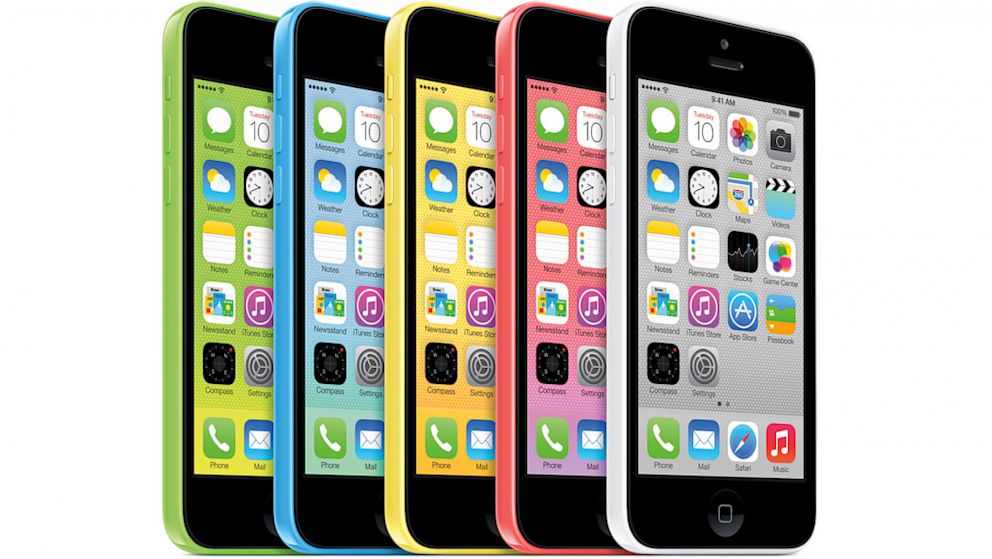 Apple's new iPhone 5s will feature Touch ID, a fingerprint sensor whcih will be used for security and authentication. This new feature will greatly aid blind and visually impaired users who currently struggle with or ignore the passcode ID security feature on the iPhone. Also, buying Apps from the App Store and music and videos from iTunes will no longer require users to enter their passwords if they have an iPhone 5s. Simply place your thumb over the home button and your transactions will now be authenticated and executed. NICE!!!