Published on Sep 12, 2017Apple introduced its latest iPhone 8 and 8Plus which comes with some upgrades over its predecessor including a faster processor, improved camera, and augmented reality capability.
Showing posts with label iOS. Show all posts
Showing posts with label iOS. Show all posts
Tuesday, September 12, 2017

Monday, June 26, 2017
Automatic Setup in iOS 11
https://youtu.be/RJdsuUVuzgg
Published on Jun 19, 2017In iOS 11 it is now possible to use an existing iOS device to set up a new one. Here is Automatic Setup in iOS 11!
Thursday, April 13, 2017
Wednesday, November 23, 2016
Chelsea Ann Stark: Hotmail And iPhone4s Frenzy

If you have a Hotmail email account you probably went through this Tuesday, November 22, 2016.
To read this post please go to http://chelseaannstark.blogspot.com/2016/08/hotmail-and-iphone4s-frenzy.html
Tuesday, September 13, 2016
Monday, July 25, 2016
How to fix iPhone battery life in the age of Snapchat and Pokémon Go ByiiMore
 |
As more users spend their days in battery-demanding apps, Apple needs to consider evolving battery life to meet that demand.
So, how can Apple and the iPhone evolve to handle them?
|
Wednesday, December 16, 2015

Monday, October 5, 2015
Apple iPhone 5S
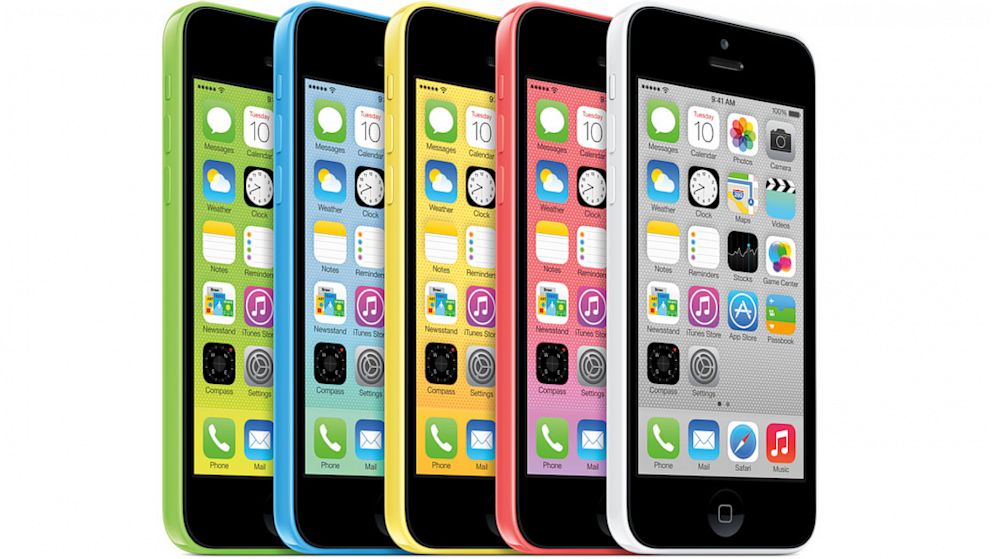 Apple's new iPhone 5s will feature Touch ID, a fingerprint sensor whcih will be used for security and authentication. This new feature will greatly aid blind and visually impaired users who currently struggle with or ignore the passcode ID security feature on the iPhone. Also, buying Apps from the App Store and music and videos from iTunes will no longer require users to enter their passwords if they have an iPhone 5s. Simply place your thumb over the home button and your transactions will now be authenticated and executed. NICE!!!
by Apple, the 5C is certainly more colorful than any other Apple phone, perhaps even more colorful than any iPod. Instead of the metallic finishes that usually adorn Apple products, the 5C's color scheme looks like it was designed by either a candy manufacturer or an elementary school art class.
However, Apple emphasizes that though it looks playful, it is still a phone equal in power and performance to the iPhone 5. Phil Schiller, Apple's VP of marketing, said that the company also hasn't skimped on its structure, saying that the 5C is reinforced with steel. "You are going to be blown away by how rigid and great it feels in your hand," said Schiller.
Monday, June 1, 2015
Apple iPhone 5
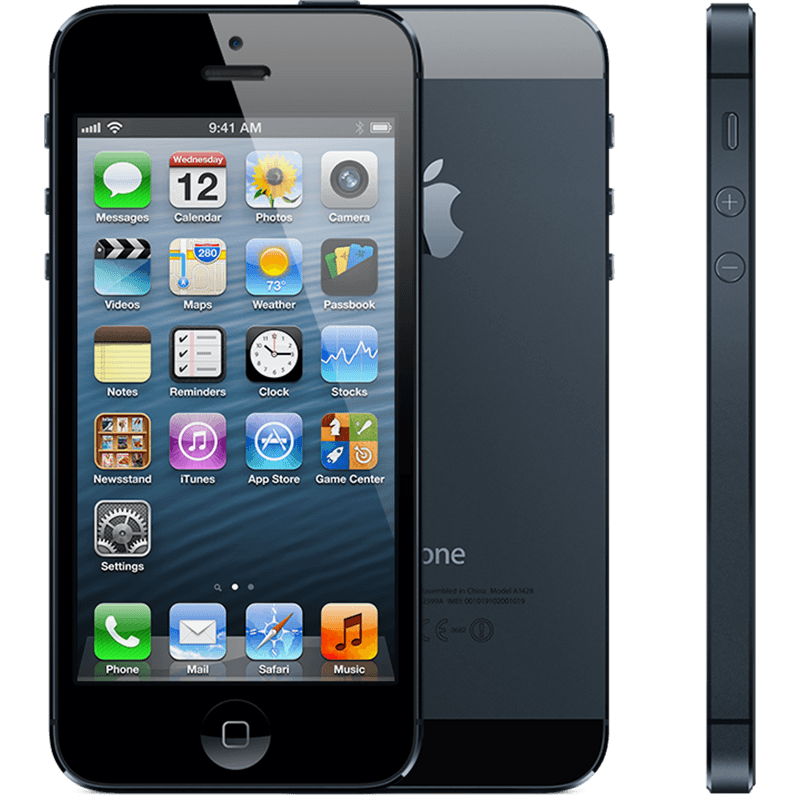
Thank you techradar.com for the information for this post.
The excitement of the rumor mill, the titillation of every leaked photo led to higher than ever levels of expectation for the iPhone 5, and while the announcement was greeted with some derision at the lack of perceived headline improvements, the record sales tell an entirely different story.
Given the underwhelming changes to the iPhone 4S, the iPhone 5 really needed to re-energize customers to prove Apple can repeat the game-changing trick it managed with the iPhone 4.
- Design
We'll begin in the traditional manner: how the thing actually feels in the hand. With the iPhone 5 there were many types of prospective buyers: the upgrader from the 4 (or more-money-than-sense iPhone 4S upgraders), those tired of their Android handset and those taking their first steps in the smartphone market and want to get one of them iThingies their friends has.

Well, all of those picking up the iPhone 5 will have the same reaction: this thing is amazingly light. You've probably heard the numbers by now (20 percent lighter than the predecessor, as well as beating most of the opposition too at 112g.)
It's an odd sensation, but it actually detracts from the experience when you first pick it up. We've praised the weighty feel of the iPhone in the past, lending it a premium feel in the face of toy-like phones, and it's almost disappointing that Apple decided to join that clan.
However, through extended use this problem quickly disappears, as the overall effect of the phone is still a chassis designed for strength, it just sits more anonymously in the pocket.

You'll obviously see the change in height, too – the iPhone 5 stands 4.87-inches tall to allow for the larger 4-inch screen. In truth, those not familiar with the iPhone 4S probably wouldn't notice the difference, which is why it's a good move from Apple to include the larger screen if it's not going put people off that hate larger phones.

The decision to stick at 4-inches is Apple's admission that while it recognizes people are all over the idea of having more screen real estate to play with it doesn't want to move away from the thumb-friendly nature of the device.
Through a mixture of moving the centre of gravity slightly as well as repositioning the screen within the bezel, it's still possible to scroll your thumb mostly around the whole display one-handed, which Apple is clearly keen to keep hold of.

However, we're not convinced of that argument any more, and the power button was still a little out of reach when using the phone normally, as was anything in the top left-hand corner of the screen.
This was no issue in reality, as scooting the phone down a bit in the palm is a natural action. But if that's the case, then why not offer a 4.3-inch screen at least?
There's more to a phone than a screen these days (although increasingly less and less) and the general construction of the iPhone 5 is excellent to say the least.

We've tested both the ceramic white version and the anodized black, and the two-tone effect on the back of the phone is stunning, both visually and under the finger.

The two sections of pigmented glass at the top and the bottom of the phone add a pleasant effect, and the sapphire glass is meant to be thoroughly durable, to complement the Gorilla Glass on the front.
Apple knows consumers get furious when they drop an iPhone, and is clearly seeking to stop the smashes before they happen with a tougher exterior - although it seems the anodized black version is more prone to scratching, which means, sadly, you'll have to think about getting a cover for that beautiful frame.
The same industrial band around the outside is in effect again as on the iPhone 4 and 4S, with small sections removed where the antenna joins.
Apple has gone for a more advanced form of antenna here, meaning the days of lost signal are gone, and generally increasing the power of your call connection and GPS lock on, too.

zYou can buy an adaptor, but it's going to be pricey: $30 when it lands in October. And unless you want to keep it permanently attached to the bottom of your iPhone 5 you'll need to buy a few, which is far from ideal.
However, let's not harangue Apple too much for this: a smaller connector is not only easier to use (you can plug the smaller cable in either way round, and the connection feels more solid), but you're rewarded with a thinner and more compact phone to boot.

The decision to move the 3.5millimeter headphone jack to the bottom is an odd one, as while it allows you to slip the phone into the pocket head-first when listening to music, which is a more natural action, it's a real pain in the posterior for some apps that will only work in landscape a certain way up.
Using it this way means your headphones experience will be one of having to jiggle the jack around two fingers.
It's not the most comfortable way to hold a phone, and even when using the phone in portrait mode, the jack gets in the way somewhat.
There are other smaller design changes to the iPhone 5 too, such as the iSight front-facing camera moving to the middle and the home button being noticeably more robust to help reduce instances of a broken portal to your home screen.

But enough about what the phone looks like - the killer question is how the thing feels in hand. We'll sum it up by saying this: smooth. It's a little slippery, and we were always worried we would drop the darn thing.
But that's the only negative thing about the design (apart from the low weight initially) as it sits in the palm nicely and allows you to do it all with one hand, including hitting the top-mounted power/lock button with ease.
That lock button is actually still loose, as it was on the iPhone 4S, meaning when you shake the phone around you can hear it clicking away, which undoes a lot of the premium feel Apple is going for.
Make no mistake, the iPhone 5 is one of the most beautifully crafted phones out there - but when you're paying $199 up front for the thing, we'd hope this would be the very minimum Apple would do.

And while it looks nice, from the front it doesn't really add much to the design of the iPhone - it's certainly not the same as the jaw-dropping design of the iPhone 4 compared to the 3GS... it's just another evolution in the iLine. It's not bad, but for those that hoped the iPhone 5 would be another big change there's a good chance they'll be disappointed about the look... until they feel the lovely back.
There was a real chance here for Apple: remove the bezel and give the front of the screen a look that's similar to the OLED TVs from the likes of Samsung or LG… but instead we're treated to the same lines as before.
You always get the feeling that Apple saves what it can for the next iteration of the iPhone, and while there's nothing wrong with the current construction we can see the edge-to-edge screen becoming something amazing on the iPhone 6.
Friday, May 1, 2015
The Apple iphone 4

I would like to think I More.com For this wonderful article.
So I can share it with other people.
Steve Jobs returned to the WWDC keynote stage on June 7, 2010. He'd introduced the iPad earlier in the year, and kicked things off with an update on how it, and the App Store had been doing. Then he turned his attention to iPhone, and after recapping Apple had done to date, he began on what would come next. It had over 100 new features. It has an all-new design, an all-new camera, and an all new screen resolution. It was hot. It was the iPhone 4.
So I can share it with other people.
Steve Jobs returned to the WWDC keynote stage on June 7, 2010. He'd introduced the iPad earlier in the year, and kicked things off with an update on how it, and the App Store had been doing. Then he turned his attention to iPhone, and after recapping Apple had done to date, he began on what would come next. It had over 100 new features. It has an all-new design, an all-new camera, and an all new screen resolution. It was hot. It was the iPhone 4.
iPhone 4: 4 times the pixels, 2 times the face
The iPhone 4, codenamed N90/N92 and model iPhone3,1, for the first time, offered significant improvements to the display. Apple went with optical lamination and an inter-plane switching (ISP) panel with light-emitting diode (LED) backlighting that made images look as if they were painted just beneath the glass, and greatly improved the viewing angle. Moreover, instead of matching competing display sizes of the time, they leap-frogged over them. To boost pixel count yet maintain compatibility with existing apps, Apple doubled both horizontal and vertical counts, while keeping the physical size constant at 3.5-inches. They went from 480x320 to 960x640. That brought the density up from 163ppi to 326ppi, and Apple made the argument that, at that point, the pixels disappeared. They called it a Retina display.
The cellular radio stayed pretty much the same, at least at first, though Apple did switch from mini to microSIM for the carrier card. Bluetooth stayed the same as well. The Wi-Fi radio went to 802.11 g/b/n, though only on the 2.4Mhz band. The kicker was, the stainless steel band around the iPhone was the antenna for all these radios. The top left contained Bluetooth, Wi-Fi, and aGPS, and the rest contained UMTS/HSPA. Steve Jobs said it had never been done before. Unfortunately, it hadn't been perfected yet either (see below). Dual mics were also added for noise cancelation and better noise quality.
Again, we had a full model number increase, which meant a full processor increase. In the case it was the custom-designed system-on-a-chip, Apple A4. It was still an ARM Cortex A8 processor, though clocked higher at 800Mhz, and the same PowerVR SGX535 graphics chip, but it would set the stage for some truly impressive work over the next few years. Storage options stayed the same at 16GB and 32GB, but RAM was increased to 512MB. Like every first generation Retina device, however, it was barely enough to support all those additional pixels. The battery was the sole exception. It jumped to 1420mAh, which meant that, even with Retina, Apple actually managed to increase useful battery life as well.
In addition to the previous accelerometer and compass, Apple added a 3-axis gyroscope to the iPhone 4, with pitch, roll, and yaw, as well as rotation around gravity. Working together they provided 6-axis motion detection. It was a huge leap forward when it came to precision control, especially for gaming.
Apple took the iPhone 4's rear camera to 5 megapixels and 720p video, but at the same 1.75 micro pixel size, and added a backside illuminated sensor (BSI) and LED flash. There was, however, one more thing. For the first time, Apple also added a front camera, VGA resolution, and while it was a boon to the profile pics and "selfies" that were growing in popularity, it also allowed Apple to launch FaceTime video calling.
Price once again stayed the same, $199 and $299 on contract.
iPhone 4: Leaps... and stumbles
As innovative and exciting as the iPhone 4 was, it was also a painful year in many ways for Apple and for the product line, starting well before the launch. On April 19, 2010, it was revealed that an iPhone 4 prototype had been separated from an Apple engineer at a Redwood City bar. That prototype eventually made its way online, resulting in Apple biggest product leak ever. While other sites got photos, the site that got the phone was Gizmodo.
The color white also provided Apple with considerable challenges. They had to prevent UV rays from yellowing it over time, and they had to prevent the opacity of the paint from interfering with the internal sensors. That took longer than they anticipated. Short term it meant the white iPhone 4 would not ship on time.
It would take until April 28, 2011 to hit the shelves.
iPhone 4: The Verizon iPhone
We wouldn't have to wait a full year for a completely new iPhone generation to get the redesigned antenna, however. We only had to wait some six months, at least for the announcement. On January 10, 2011 Apple's then-COO Tim Cook took the stage at another, separate event and announced the iPhone would, at long last, come to Verizon. It launched on February 10, and included a new antenna array that not only minimized detuning but supported CDMA and EVDO Rev A networking. It was nowhere nearly as fast as GSM HSPA, nor could it handle simultaneous voice and data, but thanks to Verizon's network, it greatly increased the reach and customer experience in the U.S.
The best iPhone ever. Again.
The iPhone 4 launched on June 15, 2010. It would hit 88 countries and 185 carriers by the end of the year. Apple also launched iOS 4 along with it. Despite an initial rollout of only 5 countries, and considerable supply constraint, they still sold 1.7 million that first weekend.
The competitive market saw BlackBerry and Microsoft continue to struggle in the dark, Palm continue to struggle in the light, and Google's Android continue to come on like a freight train. The iPhone 3G was gone, the iPhone 3GS remained, and the iPhone 4 once again took Apple to greater numbers than ever before. Nothing, however, could prepare the world for what would hit Apple next...
And only part of that was the iPhone 4s.
Monday, March 16, 2015
Evolution of the iPhone & iOS Home Screen

The visual change between iOS 7 and iOS 6 is obviously significant, and this graphic does a great job of showing just how the iOS home screen has evolved over time with the iPhone. Covering versions 1.0 through 7.0 and a time period of 2007 to 2013, it gives an interesting look into how things have changed in the past and how they are changing now:
When set alongside each other like this the newest changes with 7 look less drastic, but certainly much brighter and more colorful than before. In some ways the iOS 7 home screen has more commonality with the original 1.0 through 3.0 releases than the more recent 4, 5, and 6 builds, at least in flatness and the Dock design. If you want to get a preview of what 7.0 will look like on your iPhone or iPod touch, load these iOS 7 preview videos and screen shots on your iOS device, they do a fairly good job of what to expect, A lot has happened since 2007. Just look at how much the iPhone home screen has changed. Or how little it has? Back in the days of the first iPhone (it wasn't even called iOS yet), we couldn't get third party apps or even move apps around. Now, we have a bigger screen and all these funktastic icons.
It is impressive to see the consistency (or is it stubborness) that Apple has had with the iPhone home screen. Reddit user iKurac cooked up this graphic* to show the gradual additions and slow evolution of iOS over the years. Up until iOS 7,
it's only added new apps. Now that iOs 7 is released , iOS 1 to iOS 6 will be part of the ancient era of iPhone. Something that'll be buried in a time capsule next to Android 1.0, Blackberry, Palm and Windows Mobile.
It is impressive to see the consistency (or is it stubborness) that Apple has had with the iPhone home screen. Reddit user iKurac cooked up this graphic* to show the gradual additions and slow evolution of iOS over the years. Up until iOS 7,
it's only added new apps. Now that iOs 7 is released , iOS 1 to iOS 6 will be part of the ancient era of iPhone. Something that'll be buried in a time capsule next to Android 1.0, Blackberry, Palm and Windows Mobile.
Wednesday, September 17, 2014
The History of Apple iPhones: Apple finally announces smartwatch, but it's not an iWatch! It is called "Apple Watch".
Apple finally announces smartwatch, but it's not an iWatch! It is called "Apple Watch".
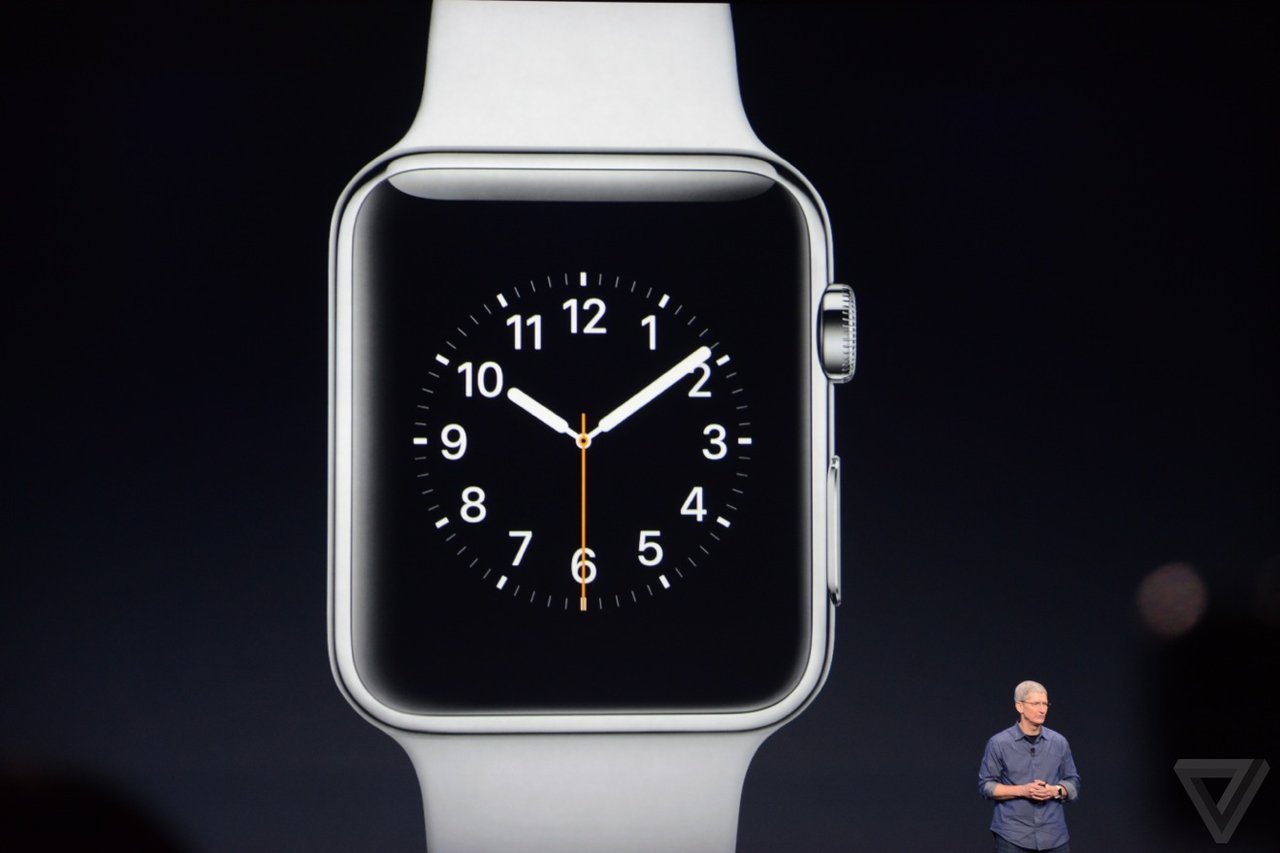
ACCESSIBILITY IMPLICATIONS OF APPLE WATCH EVENT
Apple unveiled its first smartwatch on Tuesday. The move was hotly anticipated, as Apple enters a competitive and rapidly expanding market.
People have been speculating about it for over a year, but Apple has finally unveiled its first foray into wearable technology. The Apple Watch (yep, not the iWatch), is an Apple-made smartwatch that was shown off during Apple's 9 September iPhone 6 event, with a new dial called the crown, close integration with iCloud and Siri and a flexible sapphire display. The new watches will be available starting in early 2015,"Apple introduced the world to several category-defining revolutionary product that can enrich people's lives. products, the Mac, iPod, iPhone and iPad,"
Apple announced the iPhone 6 and iPhone 6 Plus, the Apple Watch, and a brand new ApplePay tap-to-pay system to replace credit cards. Separately and together there are enormous accessibility implications for these announcements.
Here’s what I’ve put together sofar …
Firstly, I’m not going to list everything that was announced – for that you can watch the recording of the lifestream or read The 15 Most Important Announcements From The Apple Watch iPhone 6 Event. I’m just going to talk about the things that are relevant to accessibility in some way.
Lastly we have the Apple Watch, not due for release until early 2015, and a device that has left us with more accessibility questions than accessibility answers at the moment.

On the bonus side of the equation is “tactic” feedback via gentle vibrations on your wrist. This could be a really enormous bonus for many users, and the webpage also describes a “subtle audio” alternative for those who don’t want or can’t use vibrations.
Control via a “digital crown” – the button an analogue watch uses for setting or winding it – as well as a button on the side and touch-screen controls are both a plus and a minus in accessibility terms. Having a physical control mechanism makes things easier to use for some users but makes them completely inaccessible for others – users who can only use a stylus or mouthstick to access their iPhones and iPads won’t be able to manipulate a digital crown.
The Apple Watch will let you use Siri simply by lifting your wrist, or alternatively trigger Siri by pressing and holding the digital crown. None of the videos showed Siri responding verbally but since an Apple Watch can only be used in combination with an iPhone, verbal responses through the iPhone should be possible I would think.
Just having the Watch on your wrist is an accessibility bonus too – as I was writing this my phone rang and I dropped it as I struggled to get it out of my pocket fast enough to answer it. Being able to accept a call by touching my wrist would remove the urgency, and Apple says that the iOS 8 Handoff feature means I can still transfer that call to the iPhone as soon as I wrangle it out of my pocket if talking to my wrist isn’t my style.
Pulse monitoring is a big accessibility plus for me personally, too, since I have a disorder that frequently messes up my pulse rate and requires lots of pulse checking. I would think there are medical possibilities here too.
The watch bands look to be fairly good for physical accessibility in terms of taking the watches on and off – there are several options but mostly of them use magnets for closure so they are a lot less fiddly than a traditional buckle-up watch clasp.

On the big negative side, the Apple Watch is water resistant but it isn’t waterproof. For users who have memory or cognition problems that would prevent them realising they need to take it off, or users who have physical impairments meaning they can’t remove the watch and put it back on independently, this could be a big deal – especially since dunking a watch could set you back more than $350!
Everything else is still fairly unknown – will the watch be accessible to blind users? Will there be assistive touch alternatives for those who can’t manipulate the physical buttons? Will there be guided access alternatives? Low vision access options? My experience with Apple tells me that these things will all probably come over time, but they might not be there from day one, which is a big deal for disabled users who are as enthusiastic as anybody about Apple products and want to experience new technology. I sincerely hope that Apple informs us about these things as soon as possible, and has good answers!
We know how it will charge (but not how long it will stay charged)

One of the features Apple touted on Tuesday is the watch's inductive charging system.
Users will be able to charge an Apple Watch by connecting a cord magnetically to the back of the watch body.
But notably absent was any mention of how often you'll have to juice up your watch. Battery life has been a big issue among the smart watches on the market. According to the Verge, the charges among the smart watches on the market have ranged from a few hours to a week long. However, the longer-lasting ones have been more rudimentary than the Apple Watch: black-and-white displays that aren't touch screens, for example.
A glance at the newest competitors shows what the Apple Watch will be up against when it comes out in early 2015. Sony's latest offering, the SmartWatch 3, can last two days on one charge, according to the Guardian. Meanwhile, Motorola's Moto 360, was lambasted upon its release for its disappointingly short battery life. Gizmodo found that it lasts "24 hours plus."
Users will learn a new language of watch vibrations
Consider it the Apple Watch's own system of Morse Code. The watch will do turn-by-turn directions, but instead of making you listen to Siri's voice or stare at your watch screen to know where to go, it will simply tell you by feel. One type of vibration will let you know it's time to turn left. Another will tell you it's time to turn right.
The iPhones that the Apple watch will work with is
IPhone 5C, iPhone 5S, iPhone 6, plus, iPhone 6

To learn more in detail about the Apple watch please go to the link below.
Subscribe to:
Posts (Atom)