Showing posts with label iWach. Show all posts
Showing posts with label iWach. Show all posts
Wednesday, September 27, 2017
iPhone 8/8 Plus vs iPhone 7/7 Plus - Worth Upgrading?

Saturday, April 9, 2016
iPhone SE proves size doesn’t matter [Reviews

Photo: Sam Mills/Cult of Mac
I forgot how good it feels to hold 4 inches of magic in my hands.
Spending the past year and a half with the luxurious 5.5-inch screen of the iPhone 6 Plus and 6s nearly convinced me that bigger really is better. But after using the iPhone SE, I’m starting to rethink everything I love about iPhone.
The moment I clasped the iPhone SE it was like reconnecting with an ex-lover. Everything is familiar and yet it has somehow improved in nearly every single way. I’ve been re-captivated by its beauty, brains, and brawn all over again, even though on the outside, it looks like such a boring device.
How can an iPhone that looks so old feel so right?
Iconic design
If you like the classic design of the iPhone 5 and 5s you’ll love the iPhone SE. The chamfered edges don’t change the feel much. While the curved body of the iPhone 6 and iPhone 6s is elegant, the design of the iPhone SE is perfectly iconic.
The first thing I noticed when picking up the SE is how much I’ve missed the flat edges and it’s sturdy build. Having the power button back at its rightful place at the top is nice. I also love the round volume buttons, which are more distinctive than the set on the 6/6s that sit more flush with the case.
The very best thing about the iPhone SE design though is that it fits in my Donald Trump-size hands. Typing with one hand feels so damn good. The SE body also doesn’t come with a camera bump, which might become a rarity. I also realized this could be the last iPhone Apple makes with a headphone jack.
Oh yeah, and it comes in pink!
Grunt

Photo: Ste Smith/Cult of Mac
The iPhone SE is screaming fast. The only iOS device that’s markedly faster is the iPad Pro, which is utterly remarkable given its small size and budget-friendly price tag.
Cheap phones are usually underpowered, but with the A9 processor powering the iPhone SE, it can handle practically anything apps throw at it. It’s the Mighty Mouse of iPhones.
Along with the faster processor the iPhone SE has a couple other internal improvements over the iPhone 5s that make it a more modern device. Apple added faster WiFi and LTE speeds. It also packs Bluetooth 4.2, NFC and Touch ID, bringing Apple Pay support.
There’s something amazing about having a small phone that’s wicked powerful. Since reviewing the iPhone SE I haven’t had any problems with apps freezing. Multitasking has been a breeze. Editing pictures and playing games has been just as fast as on my iPhone 6s, and I’m starting to find that I prefer to do most tasks on the smaller device.
That screen

Photo: Sam Mills/Cult of Mac
No other company makes a decent smartphone with a 4-inch screen anymore. The iPhone SE isn’t just a decent phone though, its a great iPhone, and the tiny screen is actually a delight. Sure, you won’t really want to read a novel off it like the iPhone 6s Plus, but I find it’s perfect for everything I want to do on my iPhone.
The smaller size means most people will be able to reach from the bottom corner to the top without contorting your hands into some franken shape. I’m always dropping my iPhone 6s when trying to use it one-handed. The iPhone SE hasn’t slipped from my grasp once.
There are some drawbacks to the little screen though. The contrast-ration is slightly worse than the iPhone 6s. There’s also no 3D Touch, but that’s not much of a loss. I’m also not going to be able to turn it into a VR headset, and some websites and apps don’t display as nicely. However, I feel like it’s a less-distracting device.
My attention doesn’t get swallowed up by a giant screen that begs me to watch just one more YouTube video. I pull it out, check my apps, send messages, take a picture, and then it’s back in my pocket. It’s so small I almost forget it its there, unlike the 6s Plus which causes some pinching in the trousers.
The camera

Photo: Sam Mills/Cult of Mac
If you’re upgrading from an iPhone 5s or lower, the camera alone on the iPhone SE is worth the price tag. For $399 you essentially get a great point-and-shoot camera, that is also a kickass smartphone.
One reason I love the iPhone SE design is it feels so much better using it as a camera than the iPhone 6/6s. Now that Apple has added a 12MP rear-camera sensor to the 4-inch device, it seems like it could be a favorite among photographers.
The only drawback to the iPhone SE cameras is the front-facing Facetime camera. Instead of bumping up the sensor to 5 mega-pixels, Apple kept the same 1.2 mega-pixel sensor from the iPhone 5s, so your selfie-game will take a serious hit.
The pictures coming off the iPhone SE iSight camera though are just as good as the snappies you’ll get on the iPhone 6s. Low-light photos are still pretty grainy and pixelated, but it also shoots 4K video and LivePhotos. The SE actually fits comfortably in my running shorts too, so I’ll be more likely to take it with me everywhere, and pull it out more.
Amazing battery life

Photo: Sam Mills/Cult of Mac
Smaller size doesn’t mean weaker battery life. In my brief testing I’ve found the iPhone SE has way better battery life than my iPhone 6s, even though I’m using it just as much, if not more.
The iPhone SE’s pared-down features allow it to sip battery life slower while giving essentially the same performance. I can actually make it through a full day of heavy usage without needing to recharge it.
Friendly price
For the first time in my life, I bought a new Apple product without having to worry about it destroying my bank account. The $399 starting price is great for people on a budget, teens or anyone who just wants an affordable phone. The 64GB model is pretty much a no-brainer $499 upgrade though if you do anything more than surf Safari and Facebook.
Secret loves
I don’t know if I’m going to go back to my iPhone 6s.
Despite its diminutive stature, the iPhone SE is a good size with a lot of power and a perfect design that will make you fall in love all over.
The iPhone SE’s greatest feat is that it will make you question whether or not you really need an iPhone 6s. Sure the 6s is bigger. It’s got a sleeker body, and a couple new tricks. But the iPhone SE is a classic reincarnated for a farewell tour that demands your attention.
And I can’t let go.
Monday, October 5, 2015
Apple iPhone 5S
 Apple's new iPhone 5s will feature Touch ID, a fingerprint sensor whcih will be used for security and authentication. This new feature will greatly aid blind and visually impaired users who currently struggle with or ignore the passcode ID security feature on the iPhone. Also, buying Apps from the App Store and music and videos from iTunes will no longer require users to enter their passwords if they have an iPhone 5s. Simply place your thumb over the home button and your transactions will now be authenticated and executed. NICE!!!
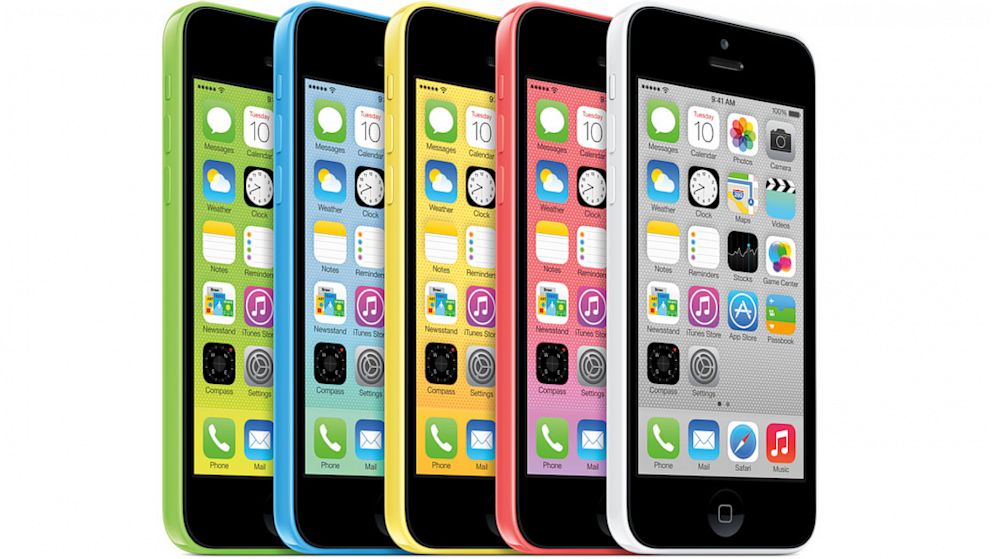
by Apple, the 5C is certainly more colorful than any other Apple phone, perhaps even more colorful than any iPod. Instead of the metallic finishes that usually adorn Apple products, the 5C's color scheme looks like it was designed by either a candy manufacturer or an elementary school art class.
However, Apple emphasizes that though it looks playful, it is still a phone equal in power and performance to the iPhone 5. Phil Schiller, Apple's VP of marketing, said that the company also hasn't skimped on its structure, saying that the 5C is reinforced with steel. "You are going to be blown away by how rigid and great it feels in your hand," said Schiller.
Friday, March 27, 2015
Want to know how to maximise the battery life on your iPhone
iPhone and iPad Apps for the Blind And Visually Impaired; Want to know how to maximise the battery life on your iphone:
 Sometime ago we did an article on 11 ways to conserve your battery with iOS 7 . Those who were running iOS 7 I hope red that existing article and followed some of those steps. This article expands on things that you can do with iOS 8. If you are new to IOS or did not read the article here are the key things we covered. Background App Refresh Location-Tracking Apps Parallax Automatic Updating Turn Off AirDrop Stop searching for Wi-Fi Turn Down the Brightness Spotlight Disable location services (for apps that don't need it) Go on a push notification diet Don't push; fetch

Want to know how to maximise the battery life on your iPhone or iPad? In this guide we'll share some advice to help keep your phone alive for as long as humanly possible.
It's written with iOS 8 in mind, which adds new features to assess your battery usage. And some new fancy features that will guzzle your battery fast if left unchecked.

First things first, you want to see what is killing your battery in the first place. iOS 8 lets you assess your battery drain on an app-by-app basis so you can easily detect energy hogs.
Simply go into the Settings app, choose 'General', tap 'Usage', and go into 'Battery Usage'. From here you can see the time since last full charge and battery usage in the last day and week.
If one app is taking up a lot of battery you may want to turn off that app's background refresh or notifications, or stop using it altogether.

Background App Refresh, which was added in iOS 7, is a way for apps to get new data when not in use, so they're up to date as soon as you load them.
It's a cool feature, but it can be a major battery drain. Either turn off individual apps that you don't need to update continually, or shut off the feature entirely. You can find it in 'General', 'Background App Refresh' in the Settings app.
Think about the way you use each app. It takes a couple seconds to grab your latest tweets when you load up a Twitter client - do you need to continuously update your timeline when you're not using it?

Location Services are another battery hog. Open Settings, go to 'Privacy', and find 'Location Services'.
Keep it on for apps where you want it to know your location. If you like to share your location when you Tweet, keep it on for Twitter. But if you never use IMDB's cinema show times feature, revoke its access to your location, here.

Push notifications can also hurt your battery life. And like background app refresh and location services, you've probably got some turned on that you don't need.
To tweak these settings open the Settings app and choose 'Notifications'. Now you'll see a list of every installed app that can send notifications. Go into apps that you don't care about and uncheck 'Allow Notifications'.

You have more options when dealing with the default Mail app. Find 'Mail, Contacts, Calendars' in Settings and tap on 'Fetch New Data'.
Push email will send emails from the mail server to your iOS device as soon as they arrive, which can hurt your battery. You may wish it to turn this setting off and use a fetch schedule.
This only looks for emails every 15 or 30 minutes, or every hour, or only when you go into the Mail app and refresh your inbox. Use whichever suits you best.

A couple tips from ex-Apple Genius Bar staffer Scotty Loveless, who has got a huge and exhaustive guide to battery drain if you want even more information.
First, stop manually closing all your apps. For starters, it's unnecessary: iOS is automatically juggling memory, putting apps in suspended animation, and killing unused memory hogs all by itself.
But more importantly for this article, constantly having to load and unload apps from your phone's random access memory is bad for battery. "All of that loading and unloading puts more stress on your device than just leaving it alone', says Loveless.

Another tip from Loveless: using your iPhone when you're in an area with crappy service can also kill the battery as the phone puts strain on its antenna to try to keep receiving phone calls and text messages.
If you're in the middle of nowhere (or inside a building that cuts off phone signal) and you don't need to use the phone right now, turn on airplane mode.
Plus, you can actually turn wi-fi back on after you enter airplane mode to continue using the web.

Changing your screen brightness can have a massive impact on your phone's battery life. Keeping it at the highest setting is a sure fire way to drain your battery (and destroy your corneas).
Set it to about 60 percent. You'll soon get used to it, and you can squeeze many minutes of battery out of your device.

If you like Steph I step instructions on each one of the steps please go to 11 Ways to Stop iOS 7 From Killing Your iPhone Battery

Want to know how to maximise the battery life on your iPhone or iPad? In this guide we'll share some advice to help keep your phone alive for as long as humanly possible.
It's written with iOS 8 in mind, which adds new features to assess your battery usage. And some new fancy features that will guzzle your battery fast if left unchecked.
First things first, you want to see what is killing your battery in the first place. iOS 8 lets you assess your battery drain on an app-by-app basis so you can easily detect energy hogs.
Simply go into the Settings app, choose 'General', tap 'Usage', and go into 'Battery Usage'. From here you can see the time since last full charge and battery usage in the last day and week.
If one app is taking up a lot of battery you may want to turn off that app's background refresh or notifications, or stop using it altogether.
Background App Refresh, which was added in iOS 7, is a way for apps to get new data when not in use, so they're up to date as soon as you load them.
It's a cool feature, but it can be a major battery drain. Either turn off individual apps that you don't need to update continually, or shut off the feature entirely. You can find it in 'General', 'Background App Refresh' in the Settings app.
Think about the way you use each app. It takes a couple seconds to grab your latest tweets when you load up a Twitter client - do you need to continuously update your timeline when you're not using it?
Location Services are another battery hog. Open Settings, go to 'Privacy', and find 'Location Services'.
Keep it on for apps where you want it to know your location. If you like to share your location when you Tweet, keep it on for Twitter. But if you never use IMDB's cinema show times feature, revoke its access to your location, here.
Push notifications can also hurt your battery life. And like background app refresh and location services, you've probably got some turned on that you don't need.
To tweak these settings open the Settings app and choose 'Notifications'. Now you'll see a list of every installed app that can send notifications. Go into apps that you don't care about and uncheck 'Allow Notifications'.
You have more options when dealing with the default Mail app. Find 'Mail, Contacts, Calendars' in Settings and tap on 'Fetch New Data'.
Push email will send emails from the mail server to your iOS device as soon as they arrive, which can hurt your battery. You may wish it to turn this setting off and use a fetch schedule.
This only looks for emails every 15 or 30 minutes, or every hour, or only when you go into the Mail app and refresh your inbox. Use whichever suits you best.
A couple tips from ex-Apple Genius Bar staffer Scotty Loveless, who has got a huge and exhaustive guide to battery drain if you want even more information.
First, stop manually closing all your apps. For starters, it's unnecessary: iOS is automatically juggling memory, putting apps in suspended animation, and killing unused memory hogs all by itself.
But more importantly for this article, constantly having to load and unload apps from your phone's random access memory is bad for battery. "All of that loading and unloading puts more stress on your device than just leaving it alone', says Loveless.
Another tip from Loveless: using your iPhone when you're in an area with crappy service can also kill the battery as the phone puts strain on its antenna to try to keep receiving phone calls and text messages.
If you're in the middle of nowhere (or inside a building that cuts off phone signal) and you don't need to use the phone right now, turn on airplane mode.
Plus, you can actually turn wi-fi back on after you enter airplane mode to continue using the web.
Changing your screen brightness can have a massive impact on your phone's battery life. Keeping it at the highest setting is a sure fire way to drain your battery (and destroy your corneas).
Set it to about 60 percent. You'll soon get used to it, and you can squeeze many minutes of battery out of your device.
When your iPhone or iPad battery is running low and you do not have a charger nearby, you could switch the device’s full-color screen to grayscale mode to extend its battery life. This feature is also great for those who are completely blind and do not need the color screen.
Go to the Settings app on your phone. Inside the app, scroll down, and choose the General setting. Among the numerous options available under the General option, we are only looking for theAccessibility option. This is the hub for many settings which improve the usability of the device. inally, turn on the Grayscale option which can be found under the Vision section. As soon as you activate the feature, your device’s screen will turn to grayscale mode.
The results may not be obvious in the Settings screen since the background is white already. However, when you go back to the home screen, you will notice that all the icons are displayed in black and white.
Please note that the feature affects the screen only. If you take a screenshot, the results will be in full-color.
Monday, March 16, 2015
Evolution of the iPhone & iOS Home Screen

The visual change between iOS 7 and iOS 6 is obviously significant, and this graphic does a great job of showing just how the iOS home screen has evolved over time with the iPhone. Covering versions 1.0 through 7.0 and a time period of 2007 to 2013, it gives an interesting look into how things have changed in the past and how they are changing now:
When set alongside each other like this the newest changes with 7 look less drastic, but certainly much brighter and more colorful than before. In some ways the iOS 7 home screen has more commonality with the original 1.0 through 3.0 releases than the more recent 4, 5, and 6 builds, at least in flatness and the Dock design. If you want to get a preview of what 7.0 will look like on your iPhone or iPod touch, load these iOS 7 preview videos and screen shots on your iOS device, they do a fairly good job of what to expect, A lot has happened since 2007. Just look at how much the iPhone home screen has changed. Or how little it has? Back in the days of the first iPhone (it wasn't even called iOS yet), we couldn't get third party apps or even move apps around. Now, we have a bigger screen and all these funktastic icons.
It is impressive to see the consistency (or is it stubborness) that Apple has had with the iPhone home screen. Reddit user iKurac cooked up this graphic* to show the gradual additions and slow evolution of iOS over the years. Up until iOS 7,
it's only added new apps. Now that iOs 7 is released , iOS 1 to iOS 6 will be part of the ancient era of iPhone. Something that'll be buried in a time capsule next to Android 1.0, Blackberry, Palm and Windows Mobile.
It is impressive to see the consistency (or is it stubborness) that Apple has had with the iPhone home screen. Reddit user iKurac cooked up this graphic* to show the gradual additions and slow evolution of iOS over the years. Up until iOS 7,
it's only added new apps. Now that iOs 7 is released , iOS 1 to iOS 6 will be part of the ancient era of iPhone. Something that'll be buried in a time capsule next to Android 1.0, Blackberry, Palm and Windows Mobile.
Wednesday, September 17, 2014
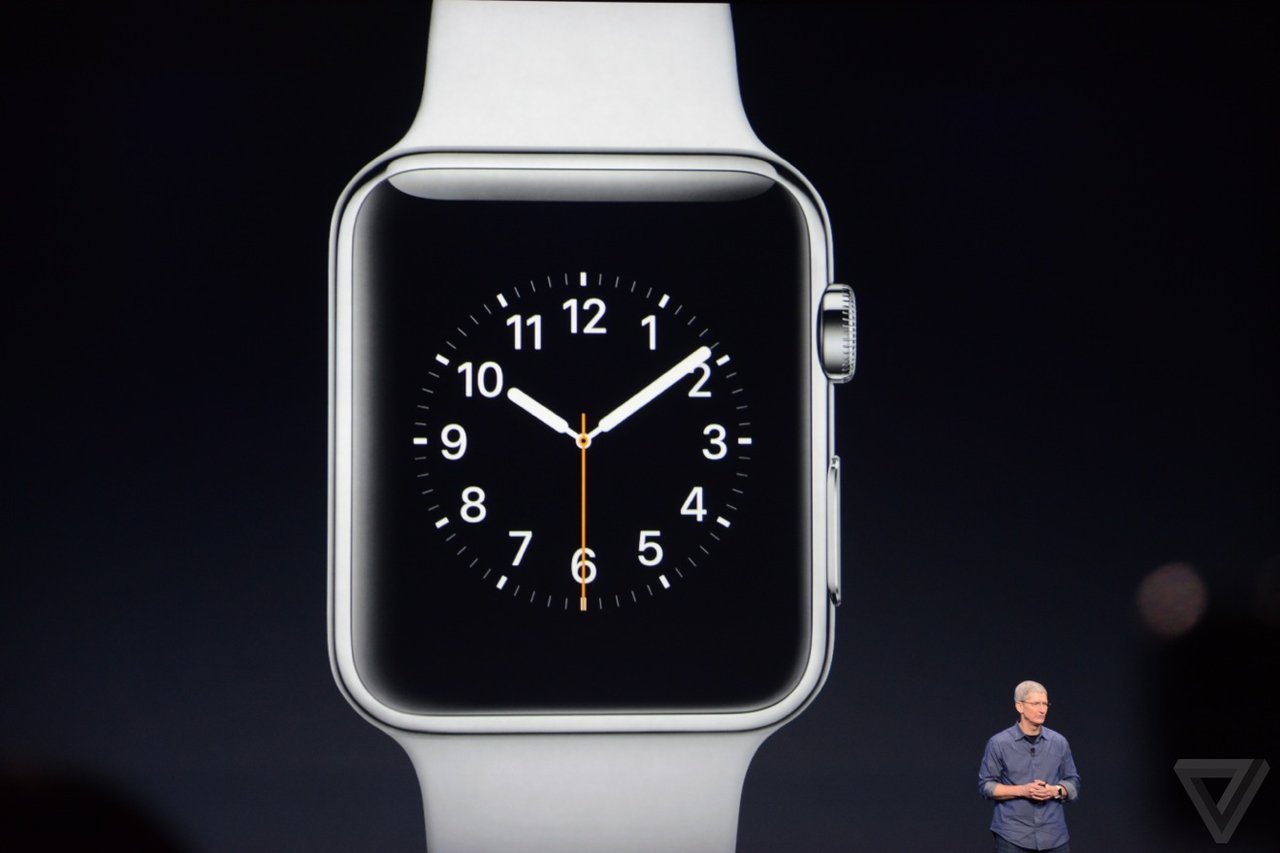
The History of Apple iPhones: Apple finally announces smartwatch, but it's not an iWatch! It is called "Apple Watch".
Apple finally announces smartwatch, but it's not an iWatch! It is called "Apple Watch".
ACCESSIBILITY IMPLICATIONS OF APPLE WATCH EVENT
Apple unveiled its first smartwatch on Tuesday. The move was hotly anticipated, as Apple enters a competitive and rapidly expanding market.
People have been speculating about it for over a year, but Apple has finally unveiled its first foray into wearable technology. The Apple Watch (yep, not the iWatch), is an Apple-made smartwatch that was shown off during Apple's 9 September iPhone 6 event, with a new dial called the crown, close integration with iCloud and Siri and a flexible sapphire display. The new watches will be available starting in early 2015,"Apple introduced the world to several category-defining revolutionary product that can enrich people's lives. products, the Mac, iPod, iPhone and iPad,"
Apple announced the iPhone 6 and iPhone 6 Plus, the Apple Watch, and a brand new ApplePay tap-to-pay system to replace credit cards. Separately and together there are enormous accessibility implications for these announcements.
Here’s what I’ve put together sofar …
Firstly, I’m not going to list everything that was announced – for that you can watch the recording of the lifestream or read The 15 Most Important Announcements From The Apple Watch iPhone 6 Event. I’m just going to talk about the things that are relevant to accessibility in some way.
Lastly we have the Apple Watch, not due for release until early 2015, and a device that has left us with more accessibility questions than accessibility answers at the moment.

On the bonus side of the equation is “tactic” feedback via gentle vibrations on your wrist. This could be a really enormous bonus for many users, and the webpage also describes a “subtle audio” alternative for those who don’t want or can’t use vibrations.
Control via a “digital crown” – the button an analogue watch uses for setting or winding it – as well as a button on the side and touch-screen controls are both a plus and a minus in accessibility terms. Having a physical control mechanism makes things easier to use for some users but makes them completely inaccessible for others – users who can only use a stylus or mouthstick to access their iPhones and iPads won’t be able to manipulate a digital crown.
The Apple Watch will let you use Siri simply by lifting your wrist, or alternatively trigger Siri by pressing and holding the digital crown. None of the videos showed Siri responding verbally but since an Apple Watch can only be used in combination with an iPhone, verbal responses through the iPhone should be possible I would think.
Just having the Watch on your wrist is an accessibility bonus too – as I was writing this my phone rang and I dropped it as I struggled to get it out of my pocket fast enough to answer it. Being able to accept a call by touching my wrist would remove the urgency, and Apple says that the iOS 8 Handoff feature means I can still transfer that call to the iPhone as soon as I wrangle it out of my pocket if talking to my wrist isn’t my style.
Pulse monitoring is a big accessibility plus for me personally, too, since I have a disorder that frequently messes up my pulse rate and requires lots of pulse checking. I would think there are medical possibilities here too.
The watch bands look to be fairly good for physical accessibility in terms of taking the watches on and off – there are several options but mostly of them use magnets for closure so they are a lot less fiddly than a traditional buckle-up watch clasp.

On the big negative side, the Apple Watch is water resistant but it isn’t waterproof. For users who have memory or cognition problems that would prevent them realising they need to take it off, or users who have physical impairments meaning they can’t remove the watch and put it back on independently, this could be a big deal – especially since dunking a watch could set you back more than $350!
Everything else is still fairly unknown – will the watch be accessible to blind users? Will there be assistive touch alternatives for those who can’t manipulate the physical buttons? Will there be guided access alternatives? Low vision access options? My experience with Apple tells me that these things will all probably come over time, but they might not be there from day one, which is a big deal for disabled users who are as enthusiastic as anybody about Apple products and want to experience new technology. I sincerely hope that Apple informs us about these things as soon as possible, and has good answers!
We know how it will charge (but not how long it will stay charged)

One of the features Apple touted on Tuesday is the watch's inductive charging system.
Users will be able to charge an Apple Watch by connecting a cord magnetically to the back of the watch body.
But notably absent was any mention of how often you'll have to juice up your watch. Battery life has been a big issue among the smart watches on the market. According to the Verge, the charges among the smart watches on the market have ranged from a few hours to a week long. However, the longer-lasting ones have been more rudimentary than the Apple Watch: black-and-white displays that aren't touch screens, for example.
A glance at the newest competitors shows what the Apple Watch will be up against when it comes out in early 2015. Sony's latest offering, the SmartWatch 3, can last two days on one charge, according to the Guardian. Meanwhile, Motorola's Moto 360, was lambasted upon its release for its disappointingly short battery life. Gizmodo found that it lasts "24 hours plus."
Users will learn a new language of watch vibrations
Consider it the Apple Watch's own system of Morse Code. The watch will do turn-by-turn directions, but instead of making you listen to Siri's voice or stare at your watch screen to know where to go, it will simply tell you by feel. One type of vibration will let you know it's time to turn left. Another will tell you it's time to turn right.
The iPhones that the Apple watch will work with is
IPhone 5C, iPhone 5S, iPhone 6, plus, iPhone 6

To learn more in detail about the Apple watch please go to the link below.
Monday, September 8, 2014
It's like Christmas Eve for Apple fans:

It's like Christmas Eve for Apple fans: Tomorrow, the company is expected to unleash its biggest product launch of the year. What will we see at the big event? Apple hasn’t been shy about stoking the fires for its Tuesday event in Cupertino, which will likely see the introduction of the iWatch and the iPhone 6. In many ways, it’s a new chapter for Apple.
Despite the hype that always accompanies the staging of an Apple event, only a handful of them over the past decade have truly mattered. It seems pretty clear that next Tuesday’s event is going to fall into that category, based on the way Apple has handled the run-up to it and the fact that we’re about to enter a new era for the storied company.
You can count those ground-breaking events from the last ten years on one hand: the 2005 iPod nano event, the 2007 Macworld that introduced the iPhone, the 2008 event that revealed how the App Store would work, and the 2010 iPad event. Sure, there were other notable moments during that period (and plenty before then) but those were the events that truly made people realize how Apple was defining the current generation of personal computing.
Something to talk about
It looks as if the new product category that Apple watchers have been clamoring for since Tim Cook became CEO in 2011 is here, in the form of what we’ll call the iWatch. We don’t know what it looks like or exactly how it will work, but we know that it will pair with the iPhone and we know that it will serve as a landmark product for those who have wondered if Apple could sustain its amazing run of innovation as we approach the third anniversary of Jobs’ death.
iWatch,

Apple's first wearable gadget could beam messages, Facebook updates, simplified apps and Siri to our wrists, eliminating the all-too-common need to take out our devices to constantly check notifications.
It's going to become especially convenient to pocket the all-but-confirmed 4.7-inch and even bigger 5.5-inch iPhone 6 in your jeans, and always stow the next 9.7-inch iPad Air 2 in a bag later this year. At the same time, iWatch leaks have pointed to Nike FuelBand SE-inspired fitness tracking and biometric sensors. Apple could possibly take more cues from the sneaker maker instead of its smartwatches rivals.
iPhone

It is unknown what source Mac Otakara derived its information from, but the site has provided accurate predictions in the past. MacRumors has also heard the iPhone 6 and iPhone 6 Plus monikers from a second source, but it remains unclear if that is indeed Apple's naming plan.
Tuesday’s event will be one of those crossroads events: one that we’ll remember either as a day Apple articulated a new vision for computing that we’ve been waiting for someone to advance — or as a sign it has overreached.
Here is a great articles to read.
The post-Steve Jobs era of Apple will officially begin on Tuesday. Here’s why.
Apple iWatch launch tomorrow: Everything we know so far.
Apple's Larger Phones May Be Called iPhone 6, iPhone 6 Plus
Subscribe to:
Posts (Atom)